<?xml version="1.0" encoding="utf-8"?>
<feed xmlns="http://www.w3.org/2005/Atom">
  <author>
    <name>cocozq</name>
  </author>
  <generator uri="https://hexo.io/">Hexo</generator>
  <id>https://cocozq.site/</id>
  <link href="https://cocozq.site/" rel="alternate"/>
  <link href="https://cocozq.site/atom.xml" rel="self"/>
  <rights>All rights reserved 2026, cocozq</rights>
  <subtitle>Indie Developer</subtitle>
  <title>cocozq</title>
  <updated>2026-10-02T08:13:55.439Z</updated>
  <entry>
    <author>
      <name>cocozq</name>
    </author>
    <category term="software-updates" scheme="https://cocozq.site/categories/software-updates/"/>
    <category term="CocoLauncher" scheme="https://cocozq.site/tags/CocoLauncher/"/>
    <category term="Android Launcher" scheme="https://cocozq.site/tags/Android-Launcher/"/>
    <category term="Minimalist" scheme="https://cocozq.site/tags/Minimalist/"/>
    <category term="Productivity" scheme="https://cocozq.site/tags/Productivity/"/>
    <category term="Mobile" scheme="https://cocozq.site/tags/Mobile/"/>
    <content>
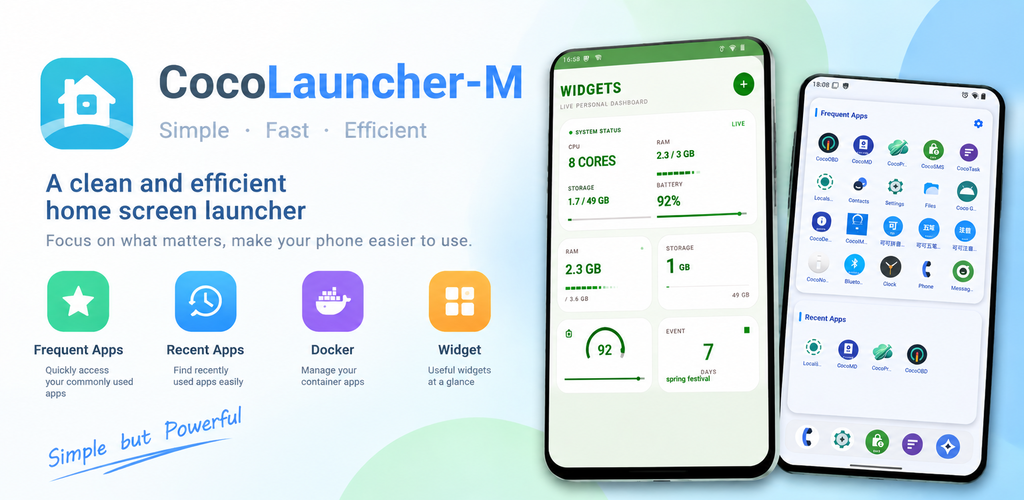
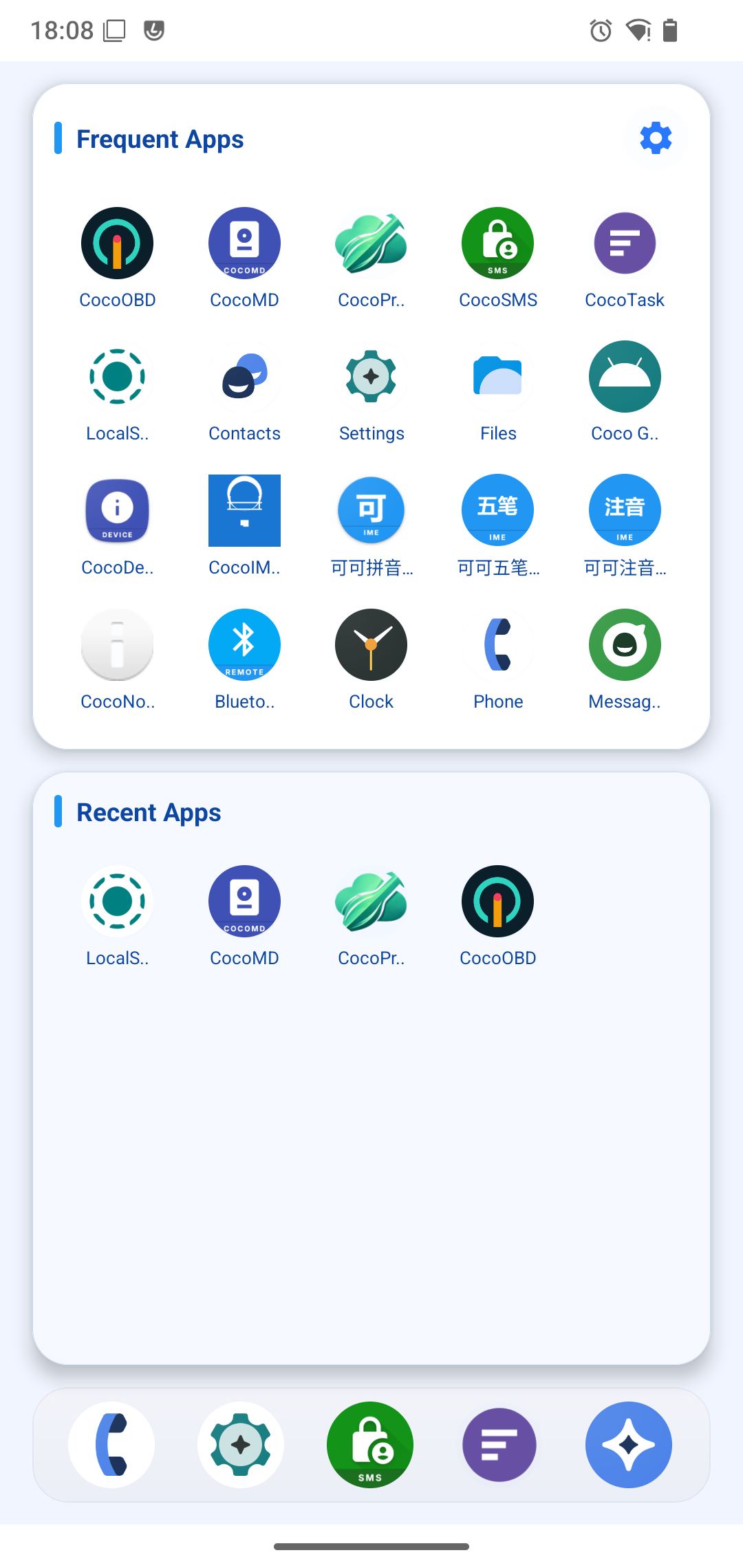
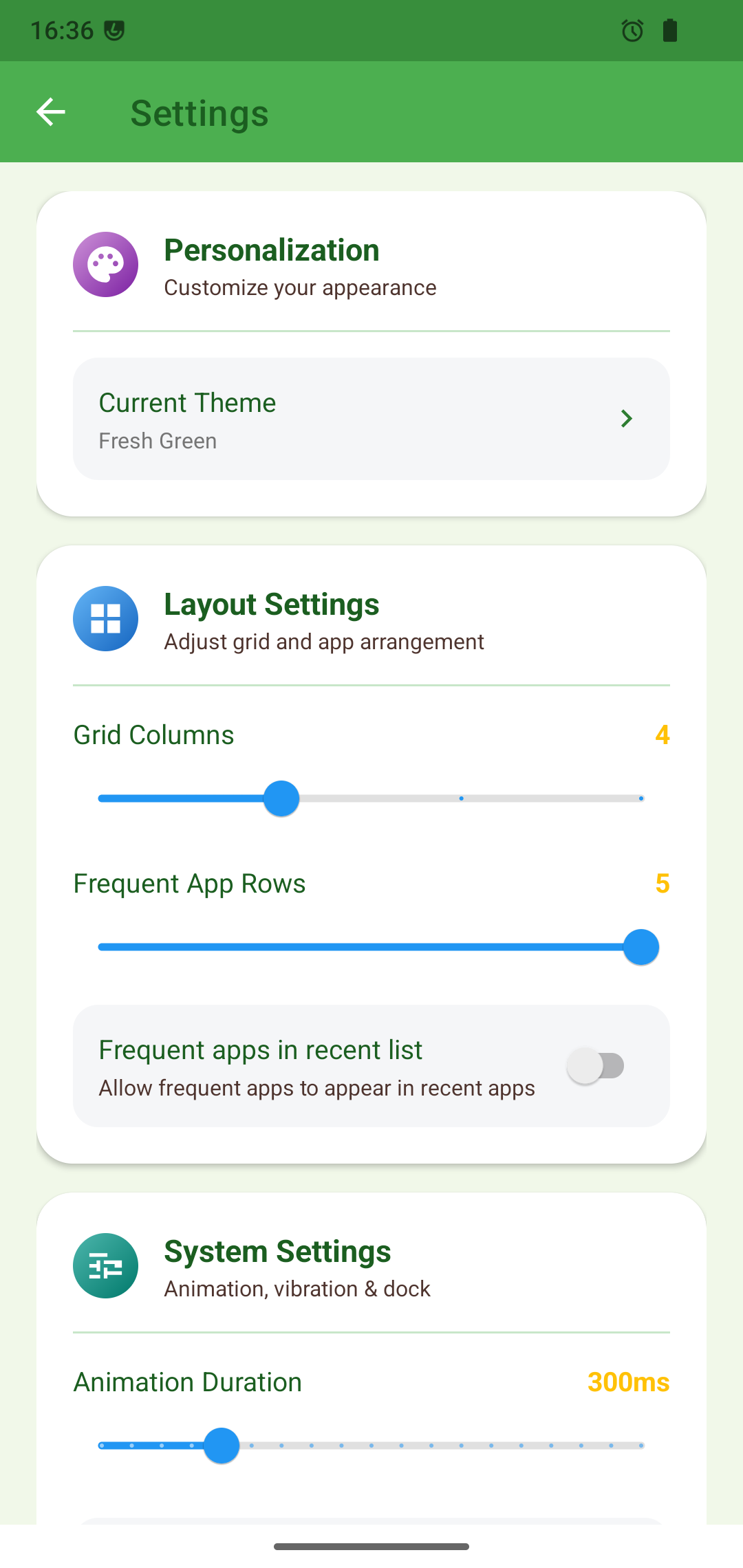
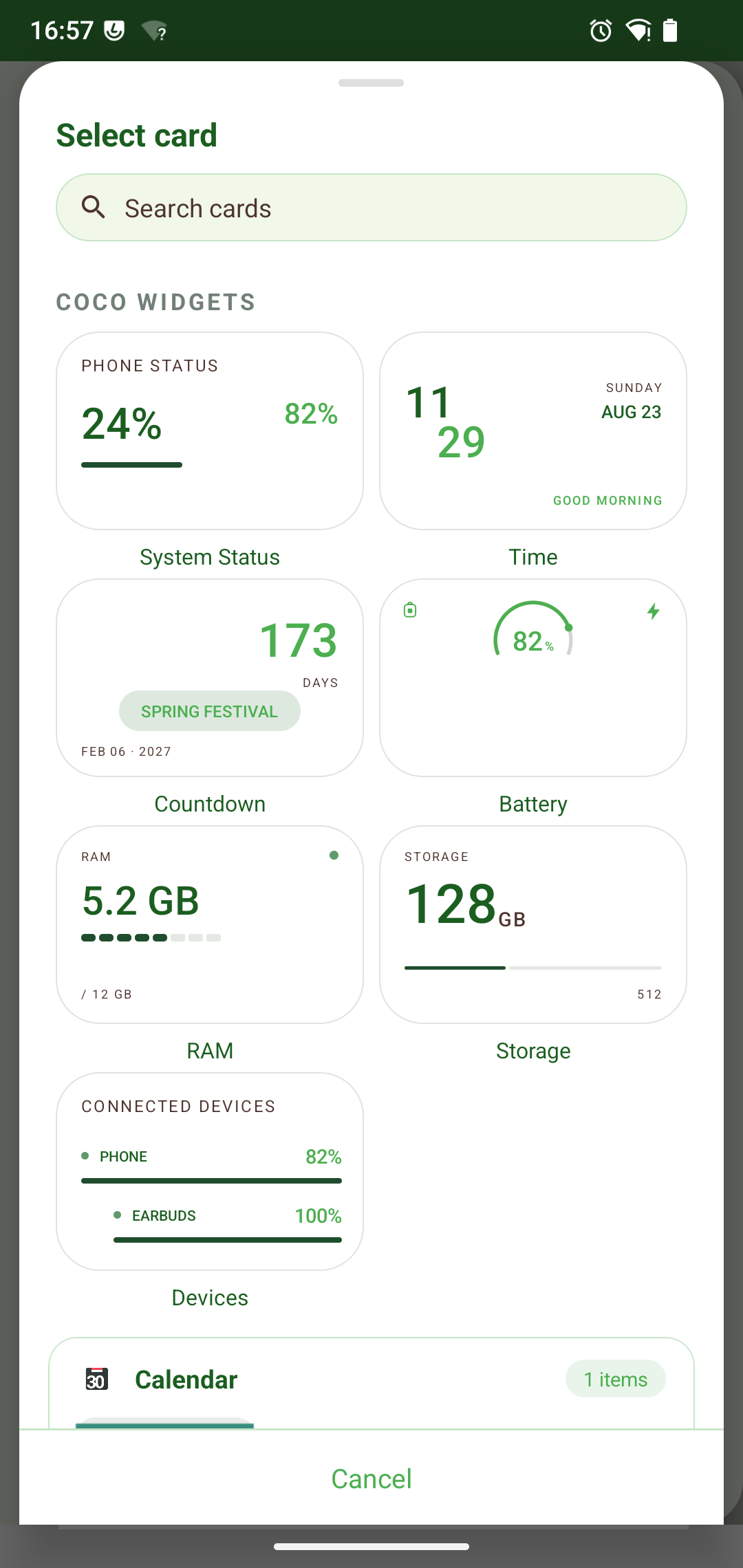
      <![CDATA[<div style="display: flex; align-items: center; gap: 16px; margin: 16px 0 24px;">  <img src="/images/cocolauncher-icon.png" alt="Coco Launcher Icon" style="width: 72px; height: 72px; border-radius: 18px; box-shadow: 0 8px 24px rgba(16, 185, 129, 0.25); margin: 0;" />  <div>    <h3 style="margin: 0 0 4px; font-size: 1.3rem;">Coco Launcher - Minimalist</h3>    <a href="https://play.google.com/store/apps/details?id=com.cocozq.launcher.mobile" target="_blank" rel="noopener" style="font-size: 0.85rem; color: #10b981; font-weight: 600; background: rgba(16, 185, 129, 0.1); padding: 3px 8px; border-radius: 6px; text-decoration: none;">Get it on Google Play</a>  </div></div><p>Your home screen should help you focus — not distract you. <strong>Coco Launcher</strong> is a clean, lightweight Android launcher for users who want a simpler, faster, distraction-free home screen.</p><p>No clutter. No unnecessary features. Just the apps and information you need.</p><span id="more"></span><div style="text-align: center; margin: 24px 0;">  <img src="/images/cocolauncher-poster.png" alt="Coco Launcher poster" style="border-radius: 14px; border: 1px solid rgba(16, 185, 129, 0.25); box-shadow: 0 10px 28px rgba(0,0,0,0.08); max-width: 100%;" /></div><h2 id="Screenshots"><a href="#Screenshots" class="headerlink" title="Screenshots"></a>Screenshots</h2><div style="display: grid; grid-template-columns: repeat(auto-fit, minmax(200px, 1fr)); gap: 16px; margin: 24px 0;">  <div style="text-align: center;">    <img src="/images/cocolauncher-screen1.png" alt="Frequent and recent apps with custom dock" style="border-radius: 12px; border: 1px solid rgba(16, 185, 129, 0.2); box-shadow: 0 6px 18px rgba(0,0,0,0.06); max-width: 100%;" />    <p style="font-size: 0.82rem; color: #64748b; margin-top: 6px;">Smart lists: Frequent & Recent Apps</p>  </div>  <div style="text-align: center;">    <img src="/images/cocolauncher-screen2.png" alt="Theme and layout settings" style="border-radius: 12px; border: 1px solid rgba(16, 185, 129, 0.2); box-shadow: 0 6px 18px rgba(0,0,0,0.06); max-width: 100%;" />    <p style="font-size: 0.82rem; color: #64748b; margin-top: 6px;">Deep customization: themes & grid</p>  </div>  <div style="text-align: center;">    <img src="/images/cocolauncher-screen3.png" alt="Information cards and widgets" style="border-radius: 12px; border: 1px solid rgba(16, 185, 129, 0.2); box-shadow: 0 6px 18px rgba(0,0,0,0.06); max-width: 100%;" />    <p style="font-size: 0.82rem; color: #64748b; margin-top: 6px;">Information cards & widgets</p>  </div></div><hr><h2 id="Why-Coco-Launcher"><a href="#Why-Coco-Launcher" class="headerlink" title="Why Coco Launcher?"></a>Why Coco Launcher?</h2><h3 id="Minimalist-Home-Screen"><a href="#Minimalist-Home-Screen" class="headerlink" title="Minimalist Home Screen"></a>Minimalist Home Screen</h3><p>A focused layout keeps your home screen clean. Frequently used and recent apps are organized automatically, so what you need is always one tap away.</p><h3 id="Smart-App-Search"><a href="#Smart-App-Search" class="headerlink" title="Smart App Search"></a>Smart App Search</h3><p>Find any app instantly by name, first letter, or Pinyin — perfect for Chinese app names and blazing-fast app launching.</p><h3 id="Smart-App-Lists"><a href="#Smart-App-Lists" class="headerlink" title="Smart App Lists"></a>Smart App Lists</h3><p>Frequently used and recently opened apps update automatically, keeping important apps always within reach without manual sorting.</p><h3 id="Custom-Dock-Bar"><a href="#Custom-Dock-Bar" class="headerlink" title="Custom Dock Bar"></a>Custom Dock Bar</h3><p>Pin your favorite apps to the dock for quick one-tap access.</p><h3 id="Information-Cards"><a href="#Information-Cards" class="headerlink" title="Information Cards"></a>Information Cards</h3><p>Swipe from the edge to glance at useful info: battery, RAM, storage, CPU, Bluetooth devices, time, and countdowns.</p><h3 id="Beautiful-Themes"><a href="#Beautiful-Themes" class="headerlink" title="Beautiful Themes"></a>Beautiful Themes</h3><p>Multiple themes plus dark mode to make the launcher truly yours.</p><h3 id="Physical-Keyboard-Support"><a href="#Physical-Keyboard-Support" class="headerlink" title="Physical Keyboard Support"></a>Physical Keyboard Support</h3><p>Launch apps instantly with hardware key shortcuts — a perfect companion for phones with physical keyboards, alongside my other keyboard-first apps.</p><h3 id="Modern-Android-Experience"><a href="#Modern-Android-Experience" class="headerlink" title="Modern Android Experience"></a>Modern Android Experience</h3><p>Gesture and 3-button navigation support with a clean edge-to-edge interface.</p><hr><h2 id="Perfect-For"><a href="#Perfect-For" class="headerlink" title="Perfect For"></a>Perfect For</h2><ul><li>Users who want a simple Android home screen</li><li>Fans of lightweight launchers</li><li>People who prefer distraction-free design</li><li>Users with physical keyboard devices</li><li>Chinese users who need Pinyin app search</li></ul><hr><h2 id="Built-for-Simplicity-Speed-Stability"><a href="#Built-for-Simplicity-Speed-Stability" class="headerlink" title="Built for Simplicity, Speed &amp; Stability"></a>Built for Simplicity, Speed &amp; Stability</h2><p>Coco Launcher focuses on simplicity, speed, and stability — a clean home screen experience made for everyday use, with no bloat and no noise.</p><hr><h2 id="Get-the-App"><a href="#Get-the-App" class="headerlink" title="Get the App"></a>Get the App</h2><div style="margin: 8px 0 20px;">  <a href="https://play.google.com/store/apps/details?id=com.cocozq.launcher.mobile" class="btn-fresh-primary" target="_blank" rel="noopener"><i class="fab fa-google-play"></i> Get it on Google Play</a></div>]]>
    </content>
    <id>https://cocozq.site/2026/10/02/introducing-coco-launcher-m/</id>
    <link href="https://cocozq.site/2026/10/02/introducing-coco-launcher-m/"/>
    <published>2026-10-01T16:00:00.000Z</published>
    <summary>
      <![CDATA[<div style="display: flex; align-items: center; gap: 16px; margin: 16px 0 24px;">
  <img src="/images/cocolauncher-icon.png" alt="Coco Launcher Icon" style="width: 72px; height: 72px; border-radius: 18px; box-shadow: 0 8px 24px rgba(16, 185, 129, 0.25); margin: 0;" />
  <div>
    <h3 style="margin: 0 0 4px; font-size: 1.3rem;">Coco Launcher - Minimalist</h3>
    <a href="https://play.google.com/store/apps/details?id=com.cocozq.launcher.mobile" target="_blank" rel="noopener" style="font-size: 0.85rem; color: #10b981; font-weight: 600; background: rgba(16, 185, 129, 0.1); padding: 3px 8px; border-radius: 6px; text-decoration: none;">Get it on Google Play</a>
  </div>
</div>

<p>Your home screen should help you focus — not distract you. <strong>Coco Launcher</strong> is a clean, lightweight Android launcher for users who want a simpler, faster, distraction-free home screen.</p>
<p>No clutter. No unnecessary features. Just the apps and information you need.</p>]]>
    </summary>
    <title>Introducing Coco Launcher: A Clean, Minimalist Android Home Screen</title>
    <updated>2026-10-02T08:13:55.439Z</updated>
  </entry>
  <entry>
    <author>
      <name>cocozq</name>
    </author>
    <category term="software-updates" scheme="https://cocozq.site/categories/software-updates/"/>
    <category term="CocoFileTV" scheme="https://cocozq.site/tags/CocoFileTV/"/>
    <category term="File Manager" scheme="https://cocozq.site/tags/File-Manager/"/>
    <category term="Android TV" scheme="https://cocozq.site/tags/Android-TV/"/>
    <category term="NAS" scheme="https://cocozq.site/tags/NAS/"/>
    <category term="Cloud Storage" scheme="https://cocozq.site/tags/Cloud-Storage/"/>
    <content>
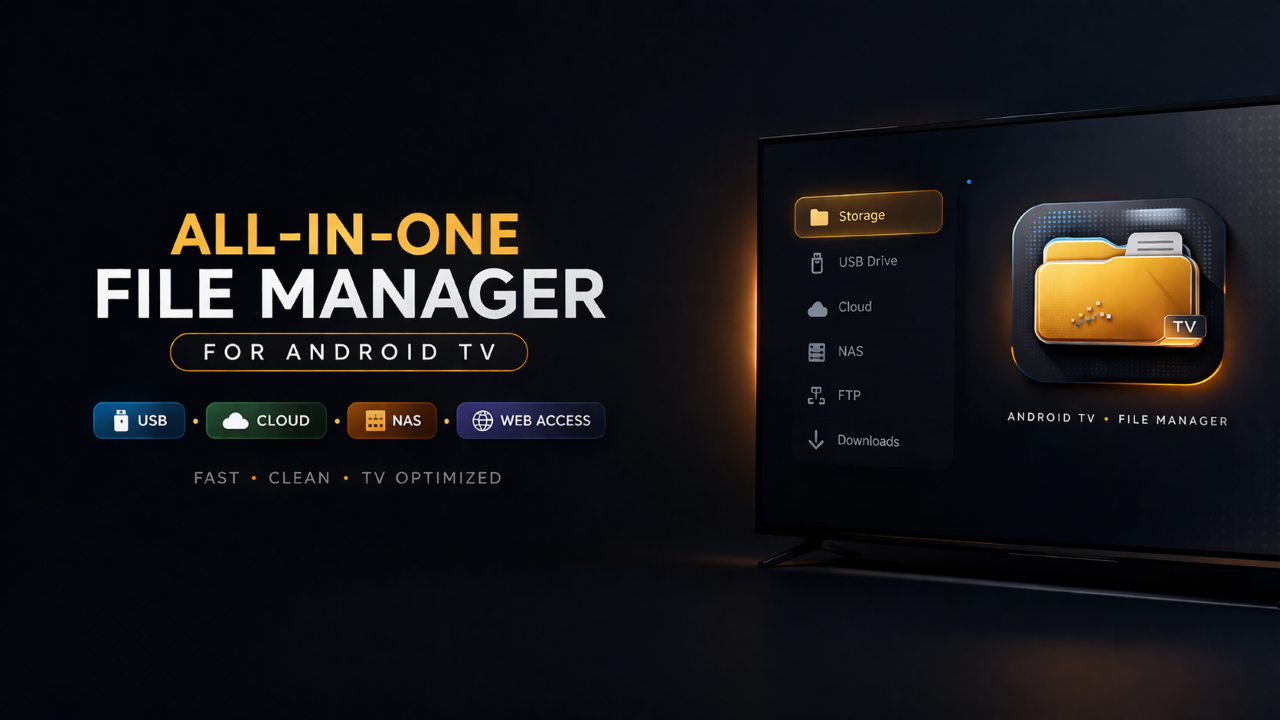
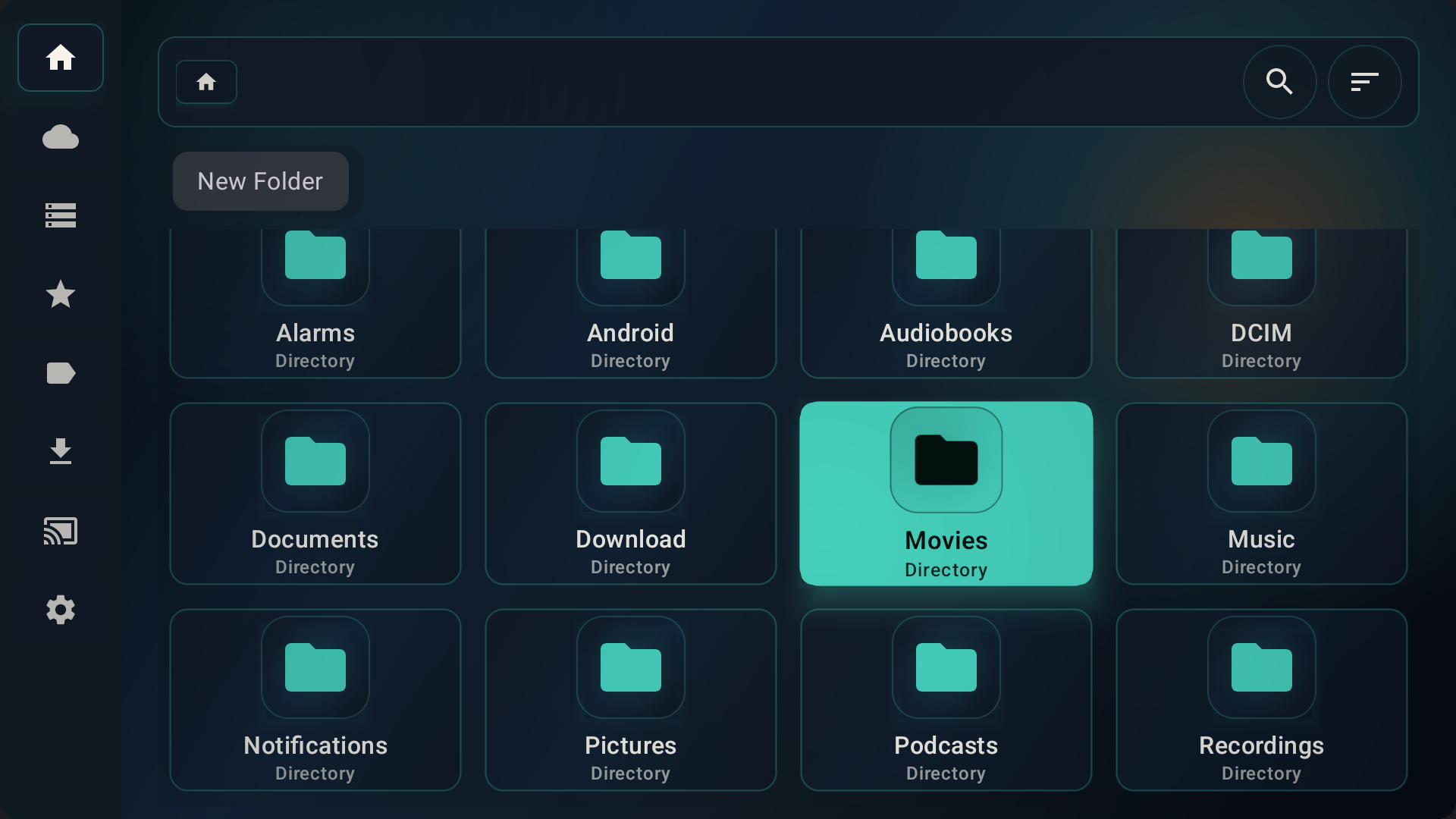
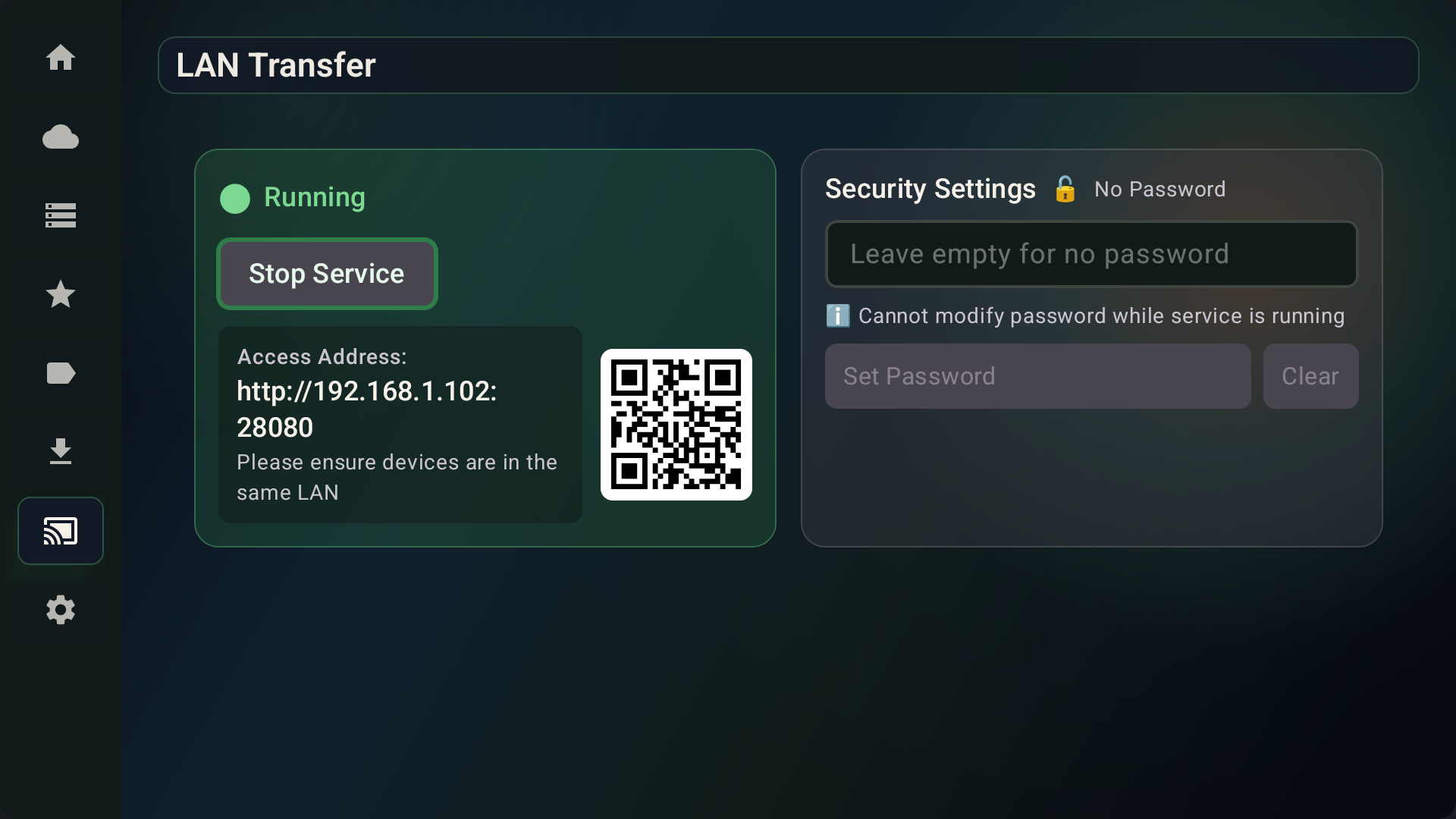
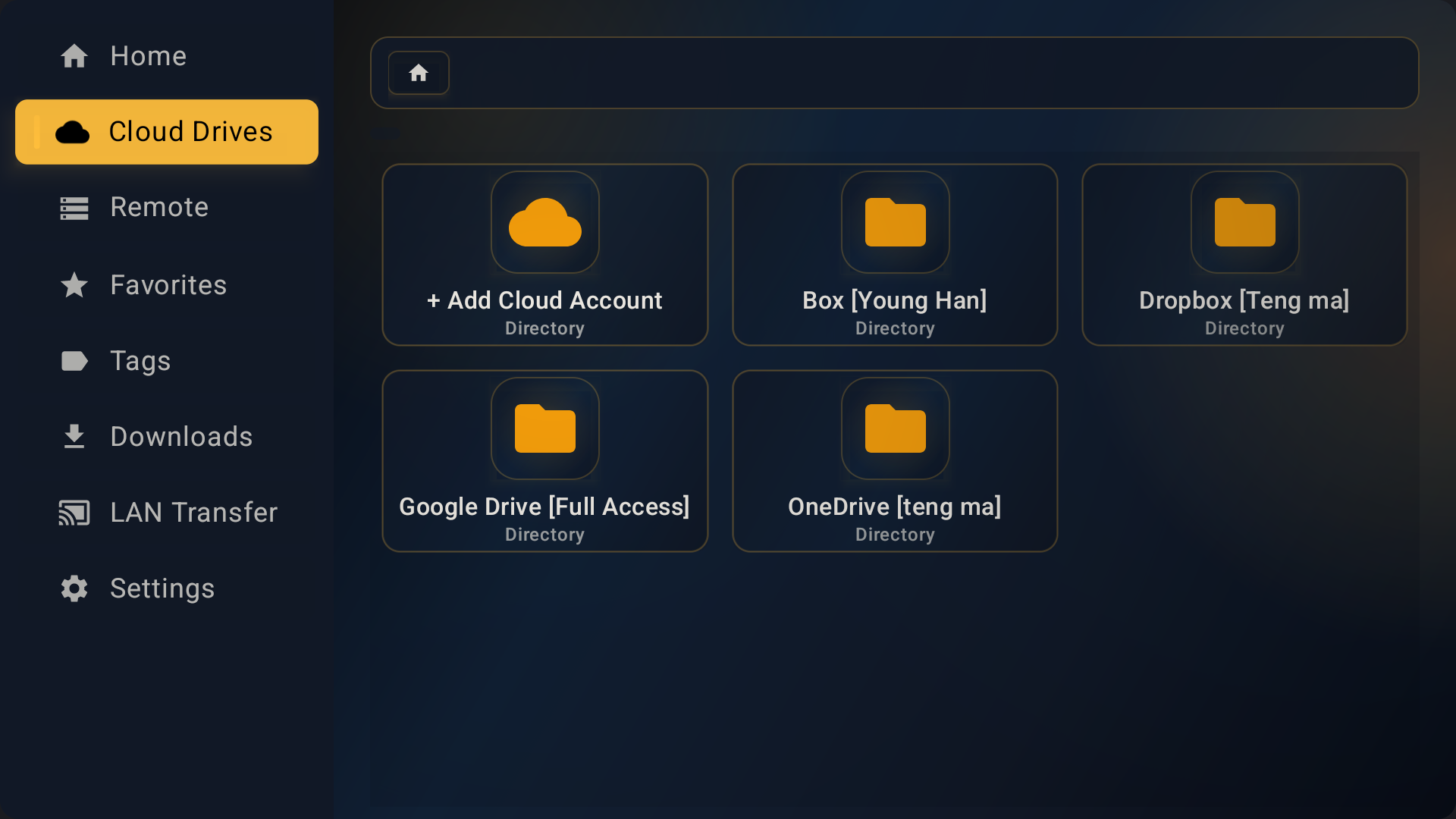
      <![CDATA[<div style="display: flex; align-items: center; gap: 16px; margin: 16px 0 24px;">  <img src="/images/cocofiletv-icon.png" alt="CocoFileTV Icon" style="width: 72px; height: 72px; border-radius: 18px; box-shadow: 0 8px 24px rgba(16, 185, 129, 0.25); margin: 0;" />  <div>    <h3 style="margin: 0 0 4px; font-size: 1.3rem;">CocoFileTV - File Manager</h3>    <a href="https://play.google.com/store/apps/details?id=com.cocozq.filemanager.tv" target="_blank" rel="noopener" style="font-size: 0.85rem; color: #10b981; font-weight: 600; background: rgba(16, 185, 129, 0.1); padding: 3px 8px; border-radius: 6px; text-decoration: none;">Get it on Google Play</a>  </div></div><p>Managing files on a TV shouldn’t feel like a chore. <strong>CocoFileTV</strong> is a powerful file manager built exclusively for Android TV — fully navigable with a D-pad remote, and optimized for the 10-foot large-screen experience.</p><p>Browse local files, USB drives, cloud storage, NAS shares, and FTP servers — all from your couch.</p><span id="more"></span><div style="text-align: center; margin: 24px 0;">  <img src="/images/cocofiletv-poster.png" alt="CocoFileTV poster" style="border-radius: 14px; border: 1px solid rgba(16, 185, 129, 0.25); box-shadow: 0 10px 28px rgba(0,0,0,0.08); max-width: 100%;" /></div><h2 id="Screenshots"><a href="#Screenshots" class="headerlink" title="Screenshots"></a>Screenshots</h2><div style="display: grid; grid-template-columns: repeat(auto-fit, minmax(220px, 1fr)); gap: 16px; margin: 24px 0;">  <div style="text-align: center;">    <img src="/images/cocofiletv-home.png" alt="CocoFileTV home screen" style="border-radius: 12px; border: 1px solid rgba(16, 185, 129, 0.2); box-shadow: 0 6px 18px rgba(0,0,0,0.06); max-width: 100%;" />    <p style="font-size: 0.82rem; color: #64748b; margin-top: 6px;">TV-optimized home dashboard</p>  </div>  <div style="text-align: center;">    <img src="/images/cocofiletv-transfer.png" alt="Scan QR code to transfer files" style="border-radius: 12px; border: 1px solid rgba(16, 185, 129, 0.2); box-shadow: 0 6px 18px rgba(0,0,0,0.06); max-width: 100%;" />    <p style="font-size: 0.82rem; color: #64748b; margin-top: 6px;">Scan-to-transfer over LAN</p>  </div>  <div style="text-align: center;">    <img src="/images/cocofiletv-cloud.png" alt="Cloud storage drives" style="border-radius: 12px; border: 1px solid rgba(16, 185, 129, 0.2); box-shadow: 0 6px 18px rgba(0,0,0,0.06); max-width: 100%;" />    <p style="font-size: 0.82rem; color: #64748b; margin-top: 6px;">Cloud drives with QR login</p>  </div></div><hr><h2 id="Key-Highlights"><a href="#Key-Highlights" class="headerlink" title="Key Highlights"></a>Key Highlights</h2><h3 id="1-Scan-to-Transfer-Files"><a href="#1-Scan-to-Transfer-Files" class="headerlink" title="1. Scan to Transfer Files"></a>1. Scan to Transfer Files</h3><p>No USB stick needed, no complicated setup. Scan the QR code shown on your TV with your phone’s browser and send files straight to the TV over the local network. It elegantly solves the age-old “how do I get files onto my TV” problem.</p><h3 id="2-Cloud-Storage-QR-Login"><a href="#2-Cloud-Storage-QR-Login" class="headerlink" title="2. Cloud Storage QR Login"></a>2. Cloud Storage QR Login</h3><p>Connect Google Drive, OneDrive, Dropbox, and Box. Instead of typing passwords with a remote, just scan the QR code and enter a short code on your phone to log in — faster and far less painful.</p><hr><h2 id="Core-Features"><a href="#Core-Features" class="headerlink" title="Core Features"></a>Core Features</h2><ul><li><strong>File &amp; folder management</strong> — browse, copy, move, delete, rename, and create folders</li><li><strong>USB &amp; external storage</strong> — access thumb drives and external disks directly</li><li><strong>Cloud storage</strong> — manage files across Google Drive, OneDrive, Dropbox, and more</li><li><strong>NAS &amp; network explorer</strong> — browse network shares seamlessly on your TV</li><li><strong>FTP client</strong> — transfer files between the TV and other devices</li><li><strong>File preview</strong> — preview text, images, and videos, with large-file paging and encoding options</li><li><strong>Search &amp; sort</strong> — find files by name, type, or path; sort by name, size, or modified time</li><li><strong>Tags &amp; filters</strong> — organize files with tags for quick access</li><li><strong>Share &amp; web management</strong> — manage files and install APKs from a browser on the same network, no USB needed</li><li><strong>Remote-control friendly</strong> — every screen designed for D-pad navigation</li></ul><hr><h2 id="Perfect-For"><a href="#Perfect-For" class="headerlink" title="Perfect For"></a>Perfect For</h2><ul><li>Managing files on Android TV &#x2F; Google TV</li><li>Browsing USB drives on the big screen</li><li>Accessing cloud storage and NAS from the couch</li><li>Installing APKs without touching a USB stick</li></ul><hr><h2 id="Privacy-Stability-First"><a href="#Privacy-Stability-First" class="headerlink" title="Privacy &amp; Stability First"></a>Privacy &amp; Stability First</h2><p>CocoFileTV focuses on stability, performance, and privacy — local-first file operations with no unnecessary data leaving your devices, delivering a smooth and reliable file management experience for TV users.</p><hr><h2 id="Get-the-App"><a href="#Get-the-App" class="headerlink" title="Get the App"></a>Get the App</h2><div style="margin: 8px 0 20px;">  <a href="https://play.google.com/store/apps/details?id=com.cocozq.filemanager.tv" class="btn-fresh-primary" target="_blank" rel="noopener"><i class="fab fa-google-play"></i> Get it on Google Play</a></div>]]>
    </content>
    <id>https://cocozq.site/2026/10/02/introducing-cocofiletv/</id>
    <link href="https://cocozq.site/2026/10/02/introducing-cocofiletv/"/>
    <published>2026-10-01T16:00:00.000Z</published>
    <summary>
      <![CDATA[<div style="display: flex; align-items: center; gap: 16px; margin: 16px 0 24px;">
  <img src="/images/cocofiletv-icon.png" alt="CocoFileTV Icon" style="width: 72px; height: 72px; border-radius: 18px; box-shadow: 0 8px 24px rgba(16, 185, 129, 0.25); margin: 0;" />
  <div>
    <h3 style="margin: 0 0 4px; font-size: 1.3rem;">CocoFileTV - File Manager</h3>
    <a href="https://play.google.com/store/apps/details?id=com.cocozq.filemanager.tv" target="_blank" rel="noopener" style="font-size: 0.85rem; color: #10b981; font-weight: 600; background: rgba(16, 185, 129, 0.1); padding: 3px 8px; border-radius: 6px; text-decoration: none;">Get it on Google Play</a>
  </div>
</div>

<p>Managing files on a TV shouldn’t feel like a chore. <strong>CocoFileTV</strong> is a powerful file manager built exclusively for Android TV — fully navigable with a D-pad remote, and optimized for the 10-foot large-screen experience.</p>
<p>Browse local files, USB drives, cloud storage, NAS shares, and FTP servers — all from your couch.</p>]]>
    </summary>
    <title>Introducing CocoFileTV: A Powerful File Manager for Android TV</title>
    <updated>2026-10-02T07:40:29.295Z</updated>
  </entry>
  <entry>
    <author>
      <name>cocozq</name>
    </author>
    <category term="software-updates" scheme="https://cocozq.site/categories/software-updates/"/>
    <category term="CocoRemote" scheme="https://cocozq.site/tags/CocoRemote/"/>
    <category term="Bluetooth HID" scheme="https://cocozq.site/tags/Bluetooth-HID/"/>
    <category term="TV Remote" scheme="https://cocozq.site/tags/TV-Remote/"/>
    <category term="Wireless Keyboard" scheme="https://cocozq.site/tags/Wireless-Keyboard/"/>
    <category term="Android" scheme="https://cocozq.site/tags/Android/"/>
    <content>
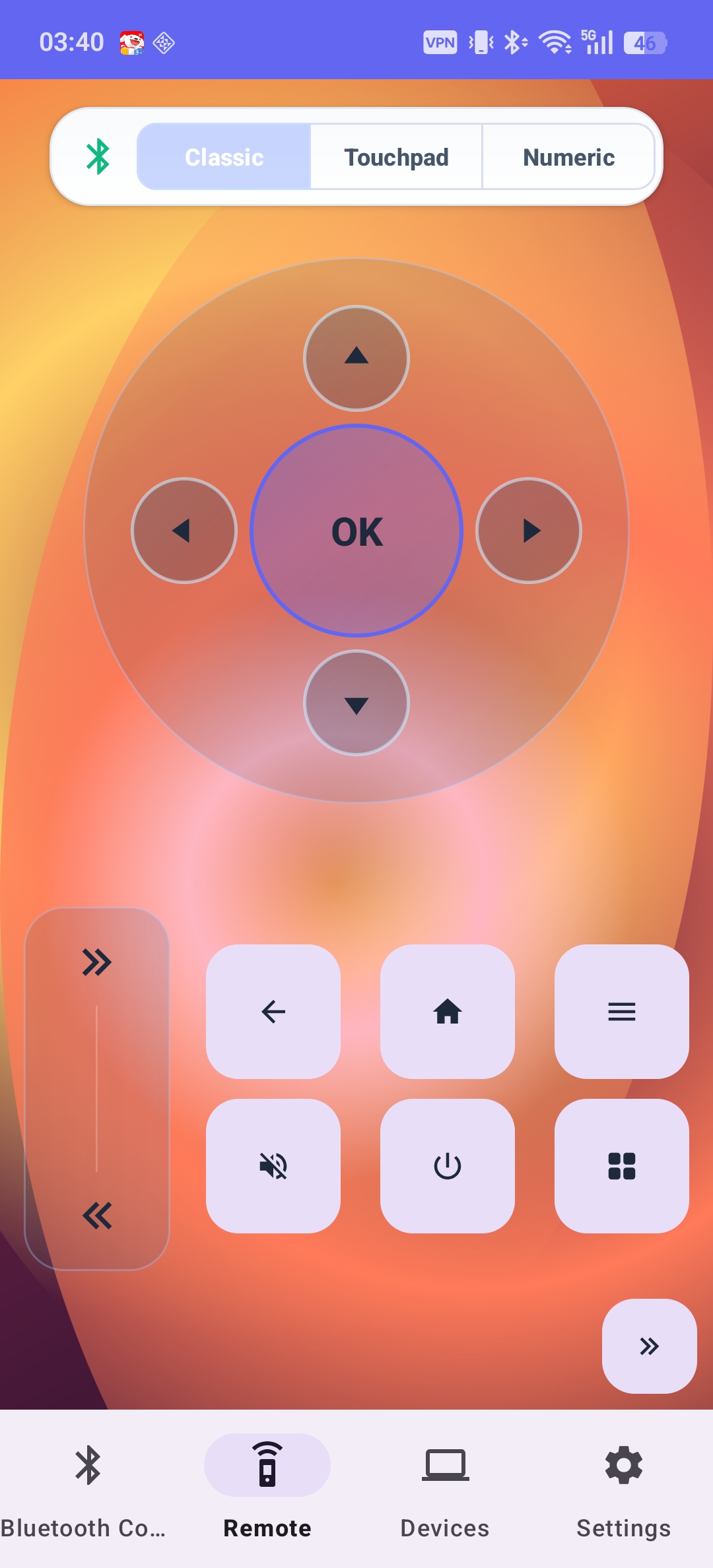
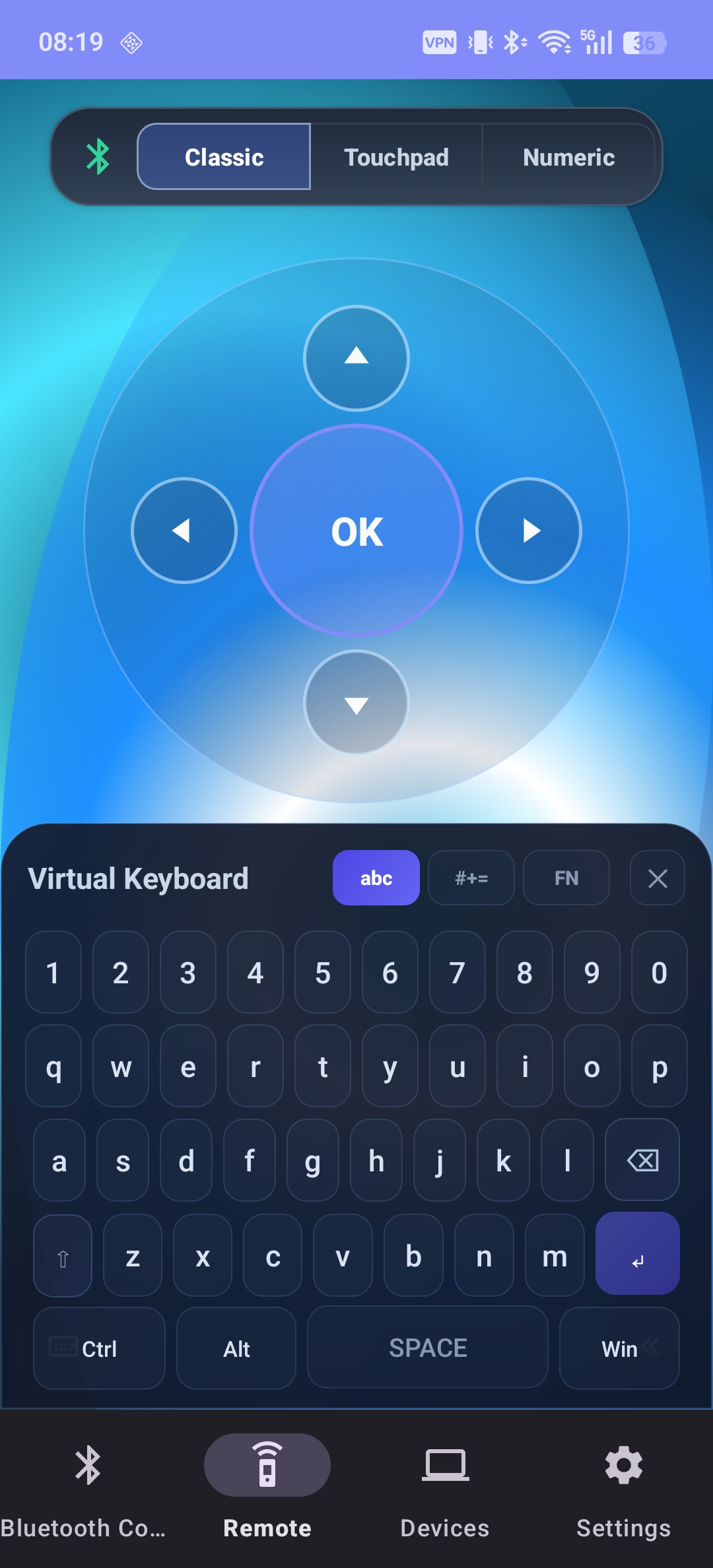
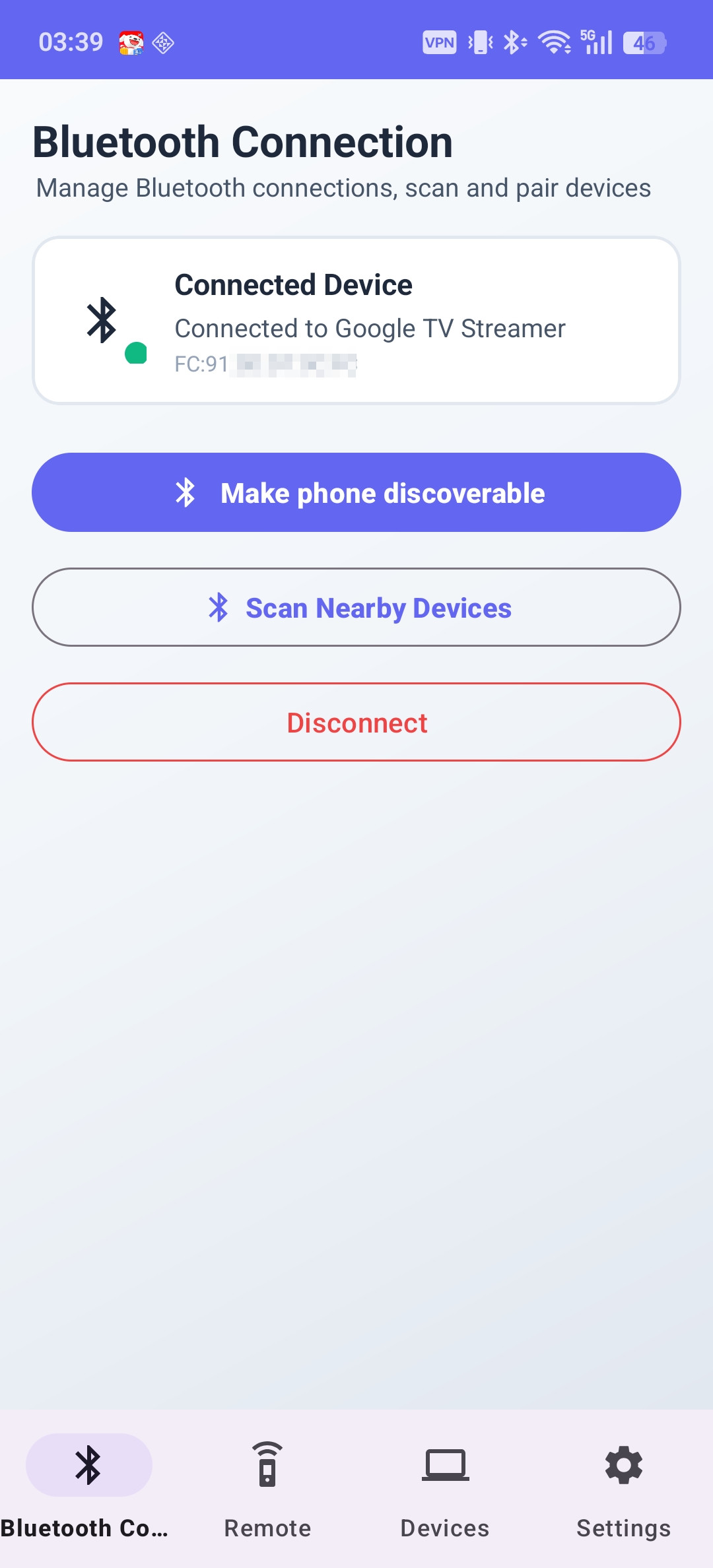
      <![CDATA[<div style="display: flex; align-items: center; gap: 16px; margin: 16px 0 24px;">  <img src="/images/cocoremote-icon.png" alt="Coco Bluetooth Remote Icon" style="width: 72px; height: 72px; border-radius: 18px; box-shadow: 0 8px 24px rgba(16, 185, 129, 0.25); margin: 0;" />  <div>    <h3 style="margin: 0 0 4px; font-size: 1.3rem;">Coco Bluetooth Remote</h3>    <a href="https://play.google.com/store/apps/details?id=com.cocozq.remote" target="_blank" rel="noopener" style="font-size: 0.85rem; color: #10b981; font-weight: 600; background: rgba(16, 185, 129, 0.1); padding: 3px 8px; border-radius: 6px; text-decoration: none;">Get it on Google Play</a>  </div></div><p>Lost your TV remote again? Typing a password with arrow keys letter by letter? <strong>Coco Bluetooth Remote</strong> turns your phone into a Bluetooth remote control, a full wireless keyboard, and a touchpad — using the standard Bluetooth HID protocol.</p><p>No app to install on your TV. No Wi-Fi needed. No cloud, no account. Just pair over Bluetooth and start controlling.</p><span id="more"></span><h2 id="Screenshots"><a href="#Screenshots" class="headerlink" title="Screenshots"></a>Screenshots</h2><div style="display: grid; grid-template-columns: repeat(auto-fit, minmax(200px, 1fr)); gap: 16px; margin: 24px 0;">  <div style="text-align: center;">    <img src="/images/cocoremote-remote-en.jpg" alt="TV remote control interface" style="border-radius: 12px; border: 1px solid rgba(16, 185, 129, 0.2); box-shadow: 0 6px 18px rgba(0,0,0,0.06); max-width: 100%;" />    <p style="font-size: 0.82rem; color: #64748b; margin-top: 6px;">Familiar TV remote layout</p>  </div>  <div style="text-align: center;">    <img src="/images/cocoremote-keyboard-en.jpg" alt="Full wireless keyboard interface" style="border-radius: 12px; border: 1px solid rgba(16, 185, 129, 0.2); box-shadow: 0 6px 18px rgba(0,0,0,0.06); max-width: 100%;" />    <p style="font-size: 0.82rem; color: #64748b; margin-top: 6px;">Full keyboard with modifiers & F-keys</p>  </div>  <div style="text-align: center;">    <img src="/images/cocoremote-pairing-en.jpg" alt="Bluetooth pairing screen" style="border-radius: 12px; border: 1px solid rgba(16, 185, 129, 0.2); box-shadow: 0 6px 18px rgba(0,0,0,0.06); max-width: 100%;" />    <p style="font-size: 0.82rem; color: #64748b; margin-top: 6px;">Pair in seconds, auto-reconnect</p>  </div></div><hr><h2 id="Why-Choose-It"><a href="#Why-Choose-It" class="headerlink" title="Why Choose It?"></a>Why Choose It?</h2><ul><li><strong>No TV-side app</strong> — works with any device that supports standard Bluetooth HID</li><li><strong>No Wi-Fi or internet required</strong> — pure local Bluetooth connection</li><li><strong>Fast, stable, low-latency</strong> — secure local communication, no cloud dependency</li></ul><hr><h2 id="Core-Features"><a href="#Core-Features" class="headerlink" title="Core Features"></a>Core Features</h2><h3 id="1-Smart-TV-Remote-Control"><a href="#1-Smart-TV-Remote-Control" class="headerlink" title="1. Smart TV Remote Control"></a>1. Smart TV Remote Control</h3><p>A familiar remote experience with D-pad navigation, OK&#x2F;Enter, Back, Home, Menu, Power (on supported devices), volume, mute, number keys, and channel switching — plus full media controls (play&#x2F;pause, stop, previous&#x2F;next track).</p><h3 id="2-Full-Wireless-Keyboard"><a href="#2-Full-Wireless-Keyboard" class="headerlink" title="2. Full Wireless Keyboard"></a>2. Full Wireless Keyboard</h3><p>Typing on a TV with a D-pad is painful. Coco Bluetooth Remote gives you a complete keyboard: letters, numbers, symbols, Ctrl&#x2F;Alt&#x2F;Shift&#x2F;Win modifiers, F1–F12, arrows, Esc&#x2F;Tab&#x2F;Backspace&#x2F;Delete, Home&#x2F;End&#x2F;Insert, Page Up&#x2F;Down, and Print Screen. Perfect for searching movies, entering passwords, or driving a PC from the couch.</p><h3 id="3-Wireless-Touchpad"><a href="#3-Wireless-Touchpad" class="headerlink" title="3. Wireless Touchpad"></a>3. Wireless Touchpad</h3><p>Turn your phone screen into a responsive touchpad with cursor movement, single&#x2F;double tap, long-press drag, and adjustable sensitivity. Great for web browsing, presentations, and desktop control.</p><h3 id="4-NEW-in-v1-0-6-Gamepad-Mode"><a href="#4-NEW-in-v1-0-6-Gamepad-Mode" class="headerlink" title="4. NEW in v1.0.6: Gamepad Mode"></a>4. NEW in v1.0.6: Gamepad Mode</h3><p>The latest update adds a gamepad remote control mode with joystick, D-pad, ABXY buttons, and triggers. It also fixes the HID keycode mapping for the number key “0” for better remote compatibility.</p><h3 id="5-Multiple-Compatibility-Modes"><a href="#5-Multiple-Compatibility-Modes" class="headerlink" title="5. Multiple Compatibility Modes"></a>5. Multiple Compatibility Modes</h3><p>Different brands handle system keys differently, so the app ships multiple key-sending modes you can switch per device. Compatible with Android TV, Google TV, smart TVs, TV boxes, projectors, Windows, macOS, and Linux — with compatibility improving every release.</p><hr><h2 id="Thoughtful-Details"><a href="#Thoughtful-Details" class="headerlink" title="Thoughtful Details"></a>Thoughtful Details</h2><ul><li>Beautiful light &amp; dark themes, one-hand-friendly layout</li><li>Auto-reconnect to the last paired device</li><li>Adjustable touchpad sensitivity and optional haptic feedback</li><li>Multi-language support</li></ul><hr><h2 id="Privacy-First"><a href="#Privacy-First" class="headerlink" title="Privacy First"></a>Privacy First</h2><p>All communication happens over local Bluetooth only:</p><ul><li>No internet connection required</li><li>No cloud servers, no accounts</li><li>No data collection, no keystroke uploads</li></ul><hr><h2 id="How-to-Use"><a href="#How-to-Use" class="headerlink" title="How to Use"></a>How to Use</h2><ol><li>Enable Bluetooth on your phone.</li><li>Open Coco Bluetooth Remote.</li><li>On your TV, TV box, or computer, search for Bluetooth devices.</li><li>Pair with <strong>Android Remote Keyboard</strong>.</li><li>Start controlling instantly.</li></ol><hr><h2 id="Get-the-App"><a href="#Get-the-App" class="headerlink" title="Get the App"></a>Get the App</h2><div style="margin: 8px 0 20px;">  <a href="https://play.google.com/store/apps/details?id=com.cocozq.remote" class="btn-fresh-primary" target="_blank" rel="noopener"><i class="fab fa-google-play"></i> Get it on Google Play</a></div>]]>
    </content>
    <id>https://cocozq.site/2026/10/01/introducing-coco-bluetooth-remote/</id>
    <link href="https://cocozq.site/2026/10/01/introducing-coco-bluetooth-remote/"/>
    <published>2026-09-30T16:00:00.000Z</published>
    <summary>
      <![CDATA[<div style="display: flex; align-items: center; gap: 16px; margin: 16px 0 24px;">
  <img src="/images/cocoremote-icon.png" alt="Coco Bluetooth Remote Icon" style="width: 72px; height: 72px; border-radius: 18px; box-shadow: 0 8px 24px rgba(16, 185, 129, 0.25); margin: 0;" />
  <div>
    <h3 style="margin: 0 0 4px; font-size: 1.3rem;">Coco Bluetooth Remote</h3>
    <a href="https://play.google.com/store/apps/details?id=com.cocozq.remote" target="_blank" rel="noopener" style="font-size: 0.85rem; color: #10b981; font-weight: 600; background: rgba(16, 185, 129, 0.1); padding: 3px 8px; border-radius: 6px; text-decoration: none;">Get it on Google Play</a>
  </div>
</div>

<p>Lost your TV remote again? Typing a password with arrow keys letter by letter? <strong>Coco Bluetooth Remote</strong> turns your phone into a Bluetooth remote control, a full wireless keyboard, and a touchpad — using the standard Bluetooth HID protocol.</p>
<p>No app to install on your TV. No Wi-Fi needed. No cloud, no account. Just pair over Bluetooth and start controlling.</p>]]>
    </summary>
    <title>
      <![CDATA[Introducing Coco Bluetooth Remote: Turn Your Phone into a TV Remote, Wireless Keyboard & Touchpad]]>
    </title>
    <updated>2026-10-02T00:49:40.854Z</updated>
  </entry>
  <entry>
    <author>
      <name>cocozq</name>
    </author>
    <category term="software-updates" scheme="https://cocozq.site/categories/software-updates/"/>
    <category term="Android" scheme="https://cocozq.site/tags/Android/"/>
    <category term="CocoIME" scheme="https://cocozq.site/tags/CocoIME/"/>
    <category term="注音輸入法" scheme="https://cocozq.site/tags/%E6%B3%A8%E9%9F%B3%E8%BC%B8%E5%85%A5%E6%B3%95/"/>
    <category term="BlackBerry" scheme="https://cocozq.site/tags/BlackBerry/"/>
    <category term="Unihertz" scheme="https://cocozq.site/tags/Unihertz/"/>
    <category term="實體鍵盤" scheme="https://cocozq.site/tags/%E5%AF%A6%E9%AB%94%E9%8D%B5%E7%9B%A4/"/>
    <content>
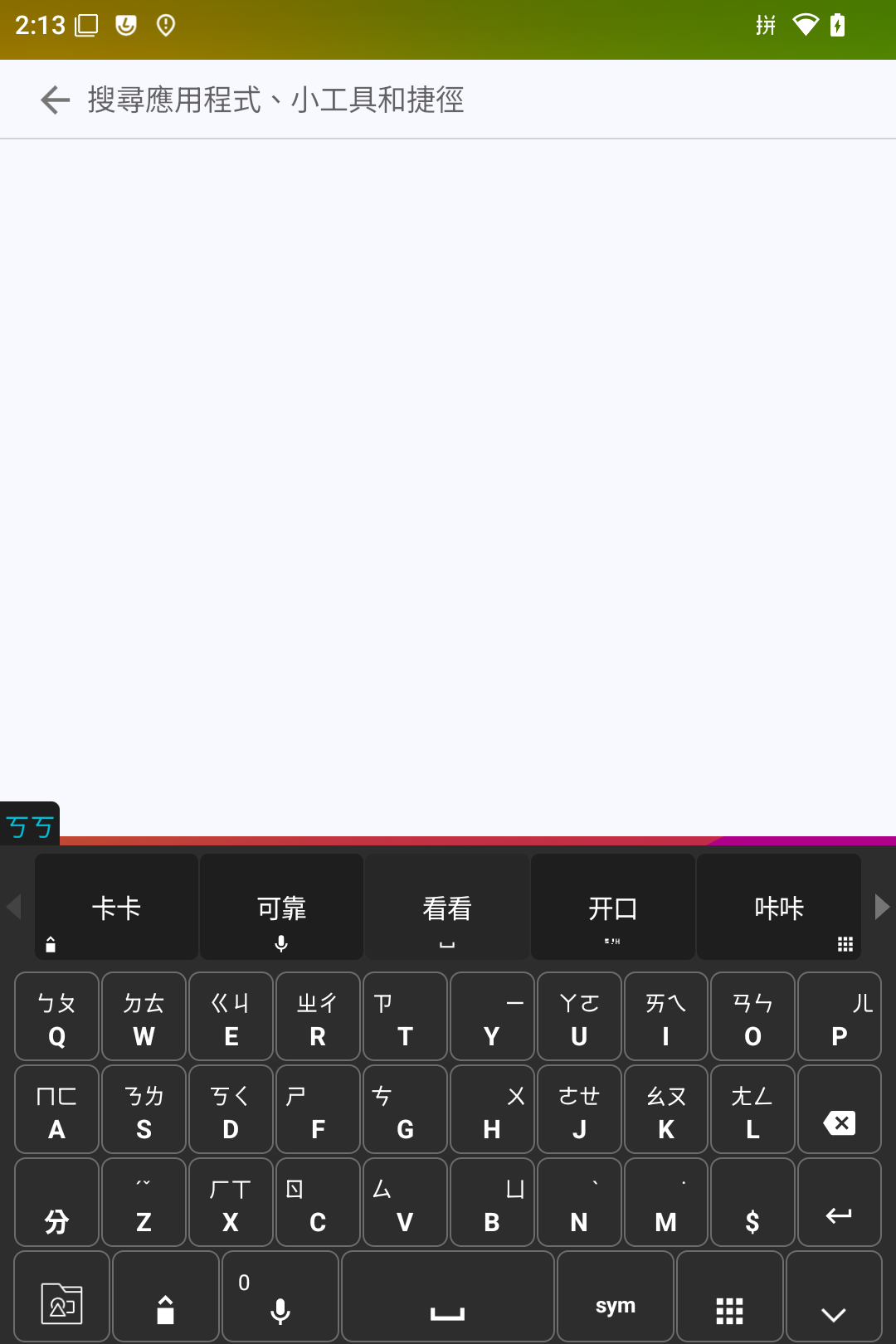
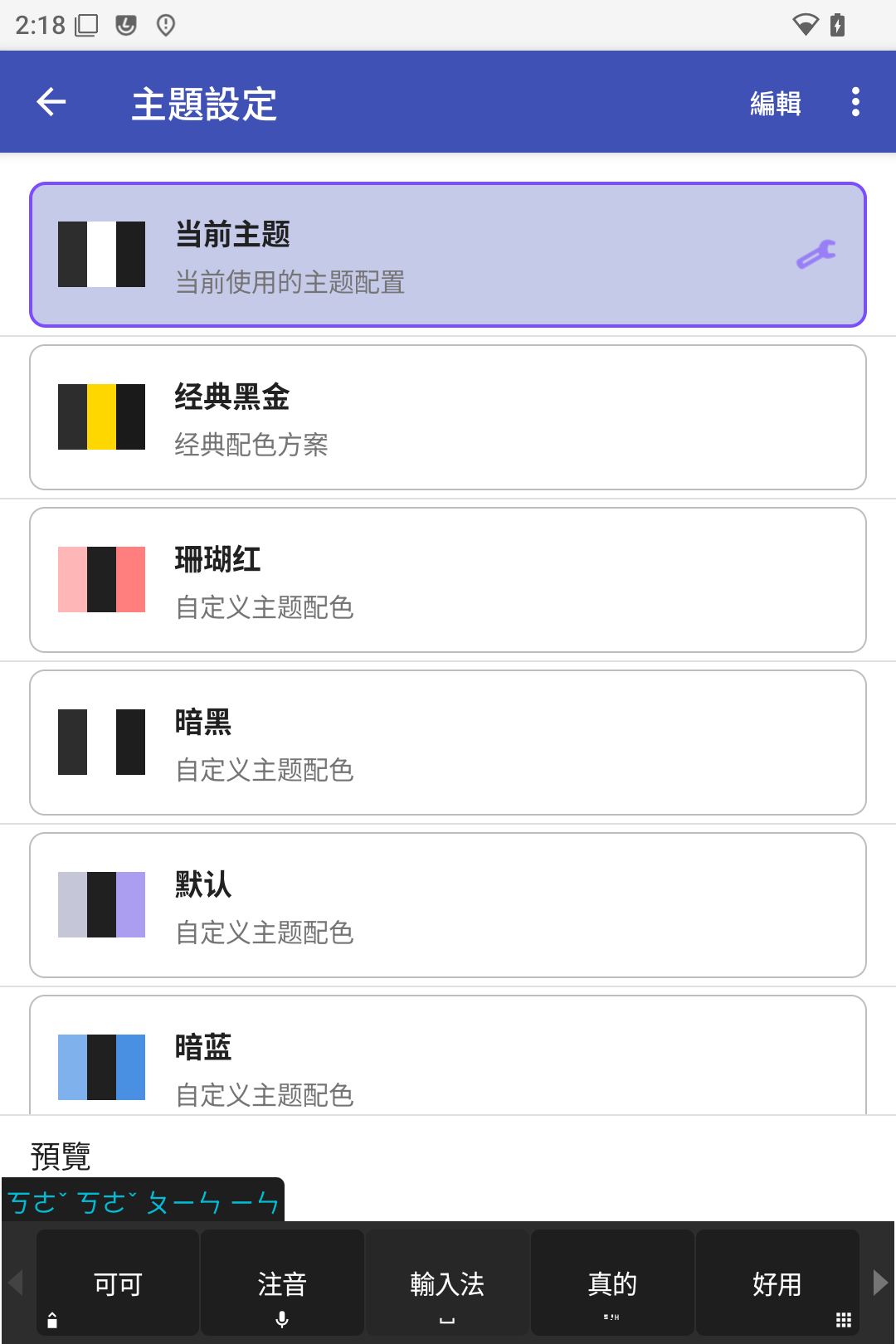
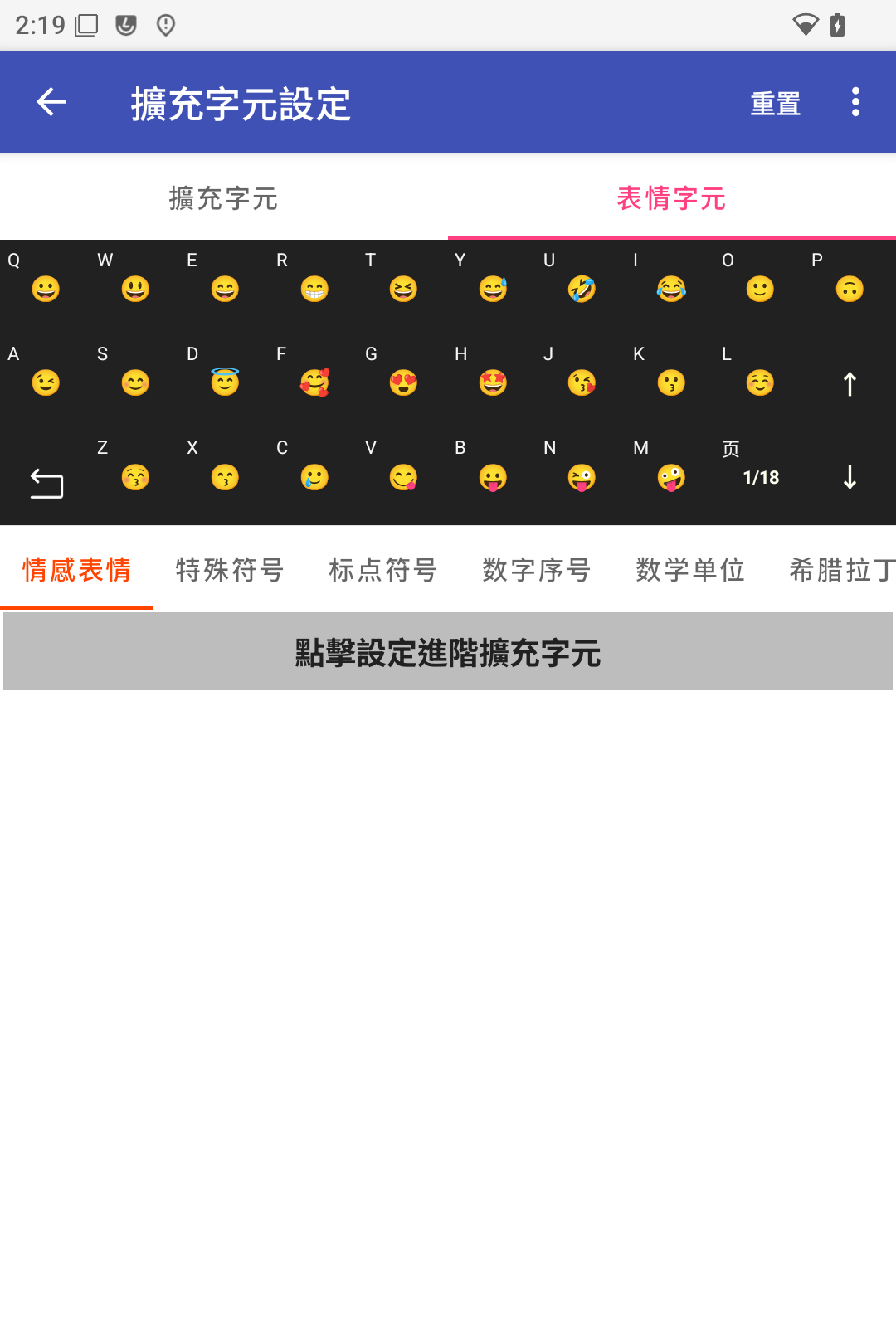
      <![CDATA[<div style="display: flex; align-items: center; gap: 16px; margin: 16px 0 24px;">  <img src="/images/cocoime-icon.png" alt="可可注音輸入法圖示" style="width: 72px; height: 72px; border-radius: 18px; box-shadow: 0 8px 24px rgba(16, 185, 129, 0.25); margin: 0;" />  <div>    <h3 style="margin: 0 0 4px; font-size: 1.3rem;">可可注音輸入法</h3>    <span style="font-size: 0.85rem; color: #10b981; font-weight: 600; background: rgba(16, 185, 129, 0.1); padding: 3px 8px; border-radius: 6px;">實體鍵盤專用 • BlackBerry 台灣注音鍵位 • 五鍵選字</span>    <div style="margin-top: 10px;">      <a href="https://play.google.com/store/apps/details?id=com.cocozq.inputmethod.zhuyin" target="_blank" rel="noopener" style="font-size: 0.85rem; color: #10b981; font-weight: 600; background: rgba(16, 185, 129, 0.1); padding: 3px 8px; border-radius: 6px; text-decoration: none;">前往 Google Play 下載</a>    </div>  </div></div><p><strong>可可注音輸入法</strong>是一款專為實體全鍵盤手機打造的注音輸入法（ㄅㄆㄇㄈ），將 37 個注音符號與聲調符號完整映射到 QWERTY 鍵盤上，沿用 BlackBerry 台灣版注音鍵位習慣，並保留廣受好評的五鍵選字體系，讓您在實體鍵盤上重現流暢極速的台灣注音輸入體驗。</p><span id="more"></span><hr><h2 id="⌨️-實體全鍵盤注音佈局（BlackBerry-經典鍵位映射）"><a href="#⌨️-實體全鍵盤注音佈局（BlackBerry-經典鍵位映射）" class="headerlink" title="⌨️ 實體全鍵盤注音佈局（BlackBerry 經典鍵位映射）"></a>⌨️ 實體全鍵盤注音佈局（BlackBerry 經典鍵位映射）</h2><p>以下為 37 個注音符號與聲調在實體 QWERTY 鍵盤上的完整分佈圖，雙符號鍵支援連按切換（Multi-Tap）：</p><div style="text-align: center; margin: 24px 0;">  <img src="/images/cocoime-layout.png" alt="可可注音輸入法實體鍵盤佈局圖" style="border-radius: 14px; border: 1px solid rgba(16, 185, 129, 0.25); box-shadow: 0 10px 28px rgba(0,0,0,0.08); max-width: 100%;" />  <p style="font-size: 0.85rem; color: #64748b; margin-top: 8px;">經典 BlackBerry 台灣版鍵位映射與連按雙符號切換說明</p></div><hr><h2 id="📱-實機畫面與介面展示"><a href="#📱-實機畫面與介面展示" class="headerlink" title="📱 實機畫面與介面展示"></a>📱 實機畫面與介面展示</h2><div style="display: grid; grid-template-columns: repeat(auto-fit, minmax(200px, 1fr)); gap: 16px; margin: 24px 0;">  <div style="text-align: center;">    <img src="/images/cocoime-screenshot1.png" alt="實體鍵盤注音介面" style="border-radius: 12px; border: 1px solid rgba(16, 185, 129, 0.2); box-shadow: 0 6px 18px rgba(0,0,0,0.06); max-width: 100%;" />    <p style="font-size: 0.82rem; color: #64748b; margin-top: 6px;">五鍵選字與實體鍵盤映射</p>  </div>  <div style="text-align: center;">    <img src="/images/cocoime-screenshot2.png" alt="繁簡切換與工具列" style="border-radius: 12px; border: 1px solid rgba(16, 185, 129, 0.2); box-shadow: 0 6px 18px rgba(0,0,0,0.06); max-width: 100%;" />    <p style="font-size: 0.82rem; color: #64748b; margin-top: 6px;">即時繁簡切換與快捷工具列</p>  </div>  <div style="text-align: center;">    <img src="/images/cocoime-screenshot3.png" alt="細緻設定與機型配對" style="border-radius: 12px; border: 1px solid rgba(16, 185, 129, 0.2); box-shadow: 0 6px 18px rgba(0,0,0,0.06); max-width: 100%;" />    <p style="font-size: 0.82rem; color: #64748b; margin-top: 6px;">連按切換時間與自訂外觀</p>  </div></div><hr><h2 id="⚡-核心亮點"><a href="#⚡-核心亮點" class="headerlink" title="⚡ 核心亮點"></a>⚡ 核心亮點</h2><h3 id="1-⌨️-實體鍵盤注音（完美傳承經典）"><a href="#1-⌨️-實體鍵盤注音（完美傳承經典）" class="headerlink" title="1. ⌨️ 實體鍵盤注音（完美傳承經典）"></a>1. ⌨️ 實體鍵盤注音（完美傳承經典）</h3><ul><li><strong>37 個注音符號 + 聲調完整映射</strong>：依循 BlackBerry 台灣版經典注音鍵位。</li><li><strong>雙符號鍵連按切換（Multi-Tap）</strong>：同一按鍵連按循環切換雙注音符號（如 <code>W</code>→<code>ㄉ</code>，連按兩下 <code>WW</code>→<code>ㄊ</code>），切換超時時間支援自訂（300~1500ms），行為與原生黑莓完全一致。</li></ul><h3 id="2-👍-五鍵選字（拇指不離主鍵盤）"><a href="#2-👍-五鍵選字（拇指不離主鍵盤）" class="headerlink" title="2. 👍 五鍵選字（拇指不離主鍵盤）"></a>2. 👍 五鍵選字（拇指不離主鍵盤）</h3><ul><li><strong>候選欄常駐 5 個候選字</strong>：<code>0</code> 鍵選擇首選字，方向鍵選第 2~5 候選字。</li><li><strong>完全免用數字鍵</strong>：真正實現盲打選字，輸入效率倍增。</li><li><strong>聲調可省略</strong>：空格直接輸出首選字，支援簡拼輸入（例如輸入 <code>ㄑㄎ</code> 直接出現「情況」）。</li></ul><h3 id="3-🔄-一鍵繁簡切換"><a href="#3-🔄-一鍵繁簡切換" class="headerlink" title="3. 🔄 一鍵繁簡切換"></a>3. 🔄 一鍵繁簡切換</h3><ul><li>工具列設有繁簡按鈕快速切換候選字輸出，亦可使用快捷鍵 <code>Sym + Del</code> 隨時切換，繁體中文即時生效。</li></ul><hr><h2 id="🛠️-豐富功能支援"><a href="#🛠️-豐富功能支援" class="headerlink" title="🛠️ 豐富功能支援"></a>🛠️ 豐富功能支援</h2><ul><li><strong>軟鍵盤模式</strong>：鍵帽同時顯示字母與注音符號，觸控螢幕手機亦能享受一致的輸入邏輯。</li><li><strong>同步顯示漢語拼音</strong>：注音框可同步提示對應拼音，幫助快速熟悉實體鍵位。</li><li><strong>手勢操作</strong>：支援上下滑動選字、左右滑動翻頁，靈敏度與有效觸控區域均可自由調整。</li><li><strong>便捷工具整合</strong>：內建剪貼簿歷史管理、輸入框算式即時計算、藍牙遙控鍵盤功能。</li><li><strong>詞庫備份與匯入</strong>：支援使用者個人詞庫備份&#x2F;還原、自訂詞庫匯入與通訊錄姓名整合。</li></ul><hr><h2 id="📱-支援機型"><a href="#📱-支援機型" class="headerlink" title="📱 支援機型"></a>📱 支援機型</h2><p>自動偵測並針對以下實體全鍵盤裝置深度調校：</p><ul><li><strong>BlackBerry 系列</strong>：KEYone &#x2F; KEY2 &#x2F; KEY2 LE &#x2F; Priv</li><li><strong>Unihertz Titan 系列</strong>：Titan &#x2F; Titan Pocket &#x2F; Titan Slim &#x2F; Titan2 Elite</li><li><strong>其他全鍵盤設備</strong>：Zinwa Q25 &#x2F; Q27、IKKO Mind One 及一般外接藍牙實體鍵盤</li></ul><hr><h2 id="下載與體驗"><a href="#下載與體驗" class="headerlink" title="下載與體驗"></a>下載與體驗</h2><div style="margin: 8px 0 20px;">  <a href="https://play.google.com/store/apps/details?id=com.cocozq.inputmethod.zhuyin" class="btn-fresh-primary" target="_blank" rel="noopener"><i class="fab fa-google-play"></i> 前往 Google Play 下載</a></div><p>可可注音輸入法專注於穩定性、原生極速效能與純淨隱私，為喜愛實體鍵盤的玩家提供無可替代的台灣注音輸入體驗。</p>]]>
    </content>
    <id>https://cocozq.site/2026/09/27/introducing-cocoime-zy/</id>
    <link href="https://cocozq.site/2026/09/27/introducing-cocoime-zy/"/>
    <published>2026-09-26T16:00:00.000Z</published>
    <summary>
      <![CDATA[<div style="display: flex; align-items: center; gap: 16px; margin: 16px 0 24px;">
  <img src="/images/cocoime-icon.png" alt="可可注音輸入法圖示" style="width: 72px; height: 72px; border-radius: 18px; box-shadow: 0 8px 24px rgba(16, 185, 129, 0.25); margin: 0;" />
  <div>
    <h3 style="margin: 0 0 4px; font-size: 1.3rem;">可可注音輸入法</h3>
    <span style="font-size: 0.85rem; color: #10b981; font-weight: 600; background: rgba(16, 185, 129, 0.1); padding: 3px 8px; border-radius: 6px;">實體鍵盤專用 • BlackBerry 台灣注音鍵位 • 五鍵選字</span>
    <div style="margin-top: 10px;">
      <a href="https://play.google.com/store/apps/details?id=com.cocozq.inputmethod.zhuyin" target="_blank" rel="noopener" style="font-size: 0.85rem; color: #10b981; font-weight: 600; background: rgba(16, 185, 129, 0.1); padding: 3px 8px; border-radius: 6px; text-decoration: none;">前往 Google Play 下載</a>
    </div>
  </div>
</div>

<p><strong>可可注音輸入法</strong>是一款專為實體全鍵盤手機打造的注音輸入法（ㄅㄆㄇㄈ），將 37 個注音符號與聲調符號完整映射到 QWERTY 鍵盤上，沿用 BlackBerry 台灣版注音鍵位習慣，並保留廣受好評的五鍵選字體系，讓您在實體鍵盤上重現流暢極速的台灣注音輸入體驗。</p>]]>
    </summary>
    <title>可可注音輸入法：專為實體全鍵盤手機打造的經典注音輸入體驗</title>
    <updated>2026-10-02T00:49:40.842Z</updated>
  </entry>
  <entry>
    <author>
      <name>cocozq</name>
    </author>
    <category term="software-updates" scheme="https://cocozq.site/categories/software-updates/"/>
    <category term="Productivity" scheme="https://cocozq.site/tags/Productivity/"/>
    <category term="Mobile" scheme="https://cocozq.site/tags/Mobile/"/>
    <category term="CocoNote" scheme="https://cocozq.site/tags/CocoNote/"/>
    <category term="Flutter" scheme="https://cocozq.site/tags/Flutter/"/>
    <category term="Indie Software" scheme="https://cocozq.site/tags/Indie-Software/"/>
    <content>
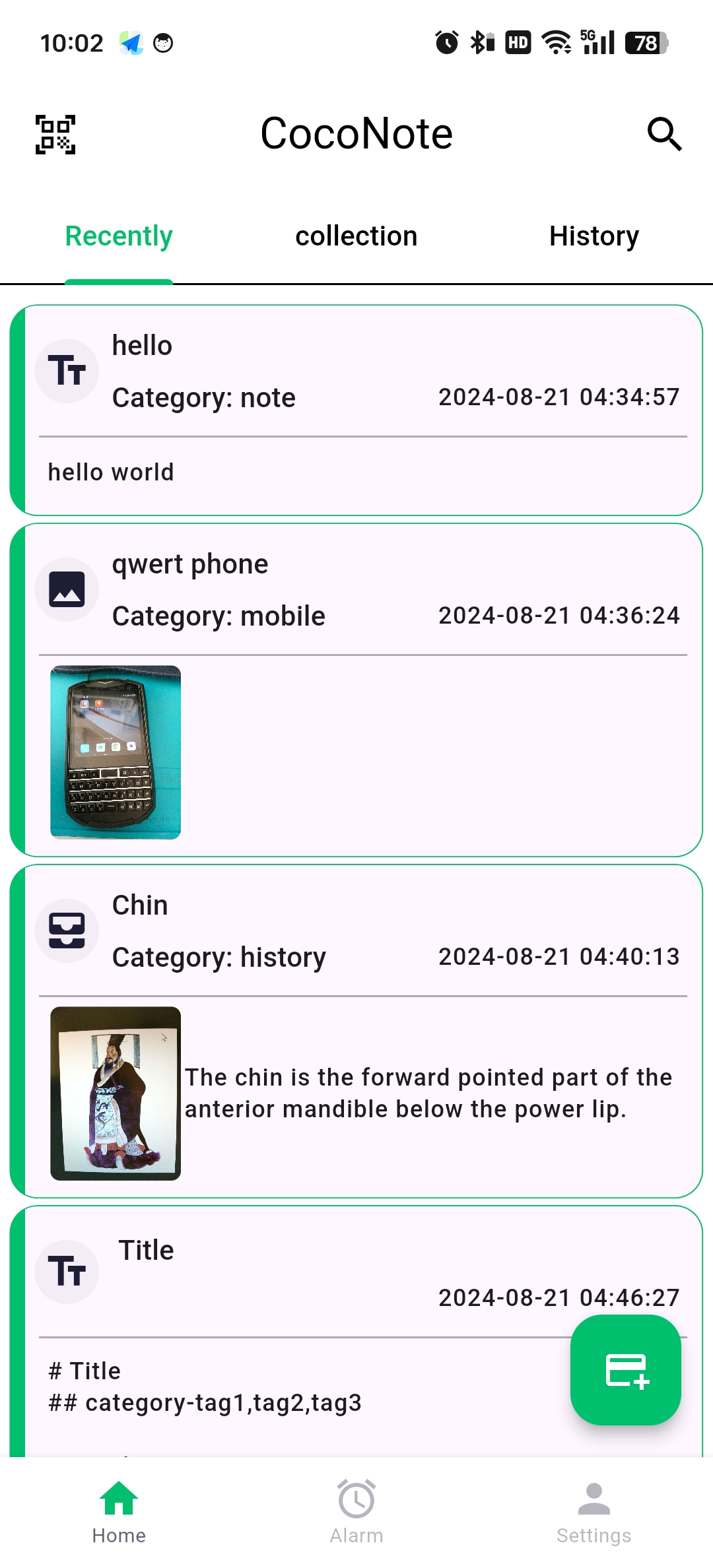
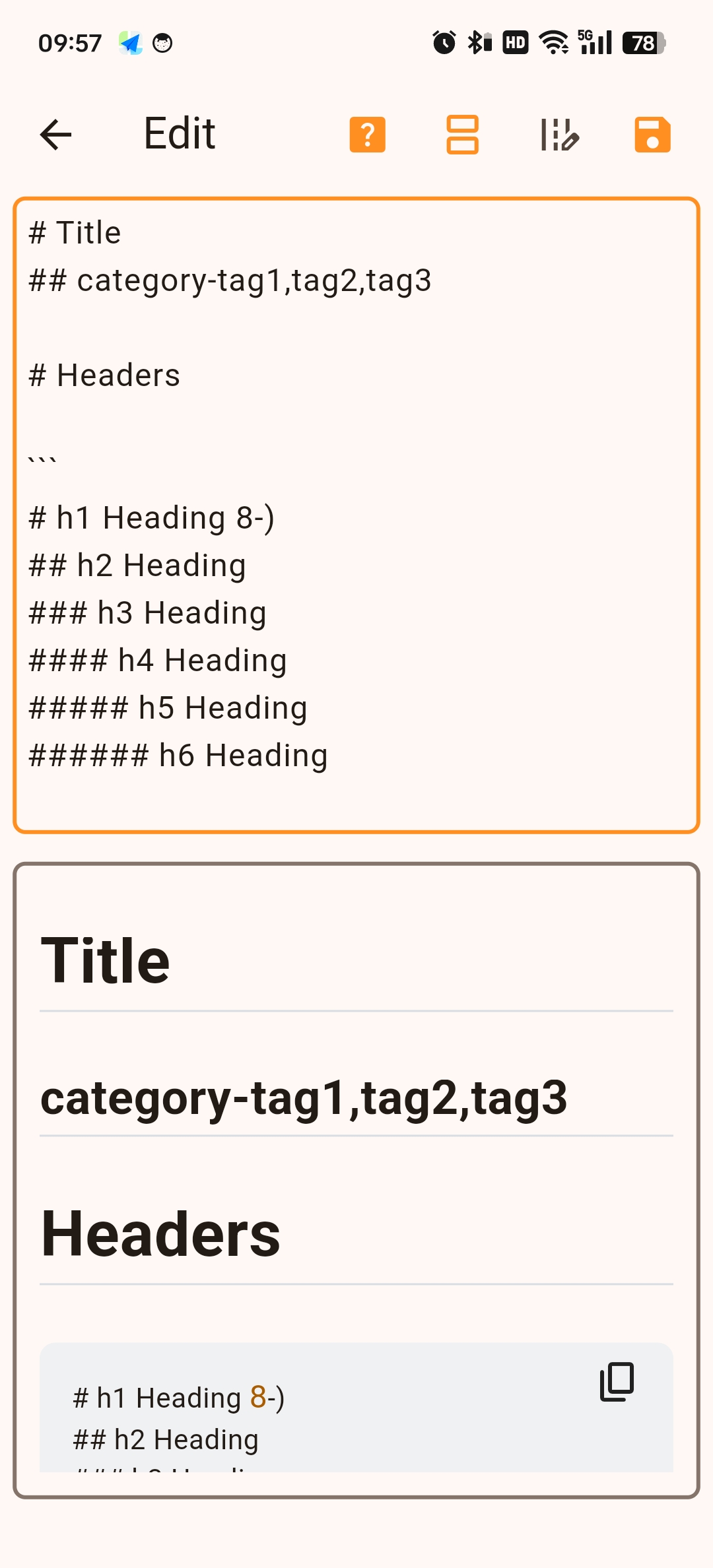
      <![CDATA[<div style="display: flex; align-items: center; gap: 16px; margin: 16px 0 24px;">  <img src="/images/coconote-icon.png" alt="CocoNote Icon" style="width: 72px; height: 72px; border-radius: 18px; box-shadow: 0 8px 24px rgba(16, 185, 129, 0.25); margin: 0;" />  <div>    <h3 style="margin: 0 0 4px; font-size: 1.3rem;">CocoNote</h3>    <a href="https://play.google.com/store/apps/details?id=com.cocozq.note" target="_blank" rel="noopener" style="font-size: 0.85rem; color: #10b981; font-weight: 600; background: rgba(16, 185, 129, 0.1); padding: 3px 8px; border-radius: 6px; text-decoration: none;">Get it on Google Play</a>  </div></div><p>Every utility tool starts with a problem close to home. For <strong>CocoNote</strong>, it was a very personal one: helping my aging parents manage their small hometown grocery store.</p><p>Today, I’m excited to share the story behind CocoNote, how it works, and how it evolved into a modern, scan-to-open everyday note-taking application.</p><span id="more"></span><h2 id="The-Origin-Story"><a href="#The-Origin-Story" class="headerlink" title="The Origin Story"></a>The Origin Story</h2><p>My parents run a small convenience store in my hometown. Over the years, with hundreds of items coming in and out, remembering the price and stock details of every single product became increasingly difficult for them.</p><p>I wanted to give them a tool that was effortless to use: <strong>point the camera at any barcode, scan it, and immediately see the product’s price, specs, and stock notes.</strong></p><p>No complex spreadsheets, no bloated POS systems with monthly subscriptions—just a clean, responsive mobile app that solves the exact problem in front of them.</p><p>As I built and refined it, I began using it for my own daily routines—tracking medication schedules, managing hardware device serial numbers, indexing household storage boxes, and logging everyday expenses. That’s how CocoNote grew into the product it is today.</p><hr><h2 id="Key-Highlights-App-Screenshots"><a href="#Key-Highlights-App-Screenshots" class="headerlink" title="Key Highlights &amp; App Screenshots"></a>Key Highlights &amp; App Screenshots</h2><div style="display: grid; grid-template-columns: repeat(auto-fit, minmax(220px, 1fr)); gap: 16px; margin: 24px 0;">  <div style="text-align: center;">    <img src="/images/coconote-home.jpg" alt="CocoNote Main Dashboard" style="border-radius: 12px; border: 1px solid rgba(16, 185, 129, 0.2); box-shadow: 0 6px 18px rgba(0,0,0,0.06); max-width: 100%;" />    <p style="font-size: 0.82rem; color: #64748b; margin-top: 6px;">Clean Note Stream & Quick Actions</p>  </div>  <div style="text-align: center;">    <img src="/images/coconote-preview.jpg" alt="CocoNote Markdown Preview" style="border-radius: 12px; border: 1px solid rgba(16, 185, 129, 0.2); box-shadow: 0 6px 18px rgba(0,0,0,0.06); max-width: 100%;" />    <p style="font-size: 0.82rem; color: #64748b; margin-top: 6px;">Rich Markdown Rendering</p>  </div>  <div style="text-align: center;">    <img src="/images/coconote-cloud.jpg" alt="CocoNote Cloud & Backup" style="border-radius: 12px; border: 1px solid rgba(16, 185, 129, 0.2); box-shadow: 0 6px 18px rgba(0,0,0,0.06); max-width: 100%;" />    <p style="font-size: 0.82rem; color: #64748b; margin-top: 6px;">Encrypted Sync & Cloud Backup</p>  </div></div><hr><h2 id="Core-Features"><a href="#Core-Features" class="headerlink" title="Core Features"></a>Core Features</h2><h3 id="1-Scan-to-Open-Notes-Barcode-QR-Code-Binding"><a href="#1-Scan-to-Open-Notes-Barcode-QR-Code-Binding" class="headerlink" title="1. Scan-to-Open Notes (Barcode &amp; QR Code Binding)"></a>1. Scan-to-Open Notes (Barcode &amp; QR Code Binding)</h3><p>The core highlight of CocoNote. Bind any QR code or standard barcode to a specific note. Whether you are scanning a product in a store, a server rack label, or a storage box in your garage, one scan brings up the exact note and details instantly.</p><h3 id="2-Encrypted-Note-Sharing"><a href="#2-Encrypted-Note-Sharing" class="headerlink" title="2. Encrypted Note Sharing"></a>2. Encrypted Note Sharing</h3><p>Privacy matters. CocoNote lets you generate encrypted shareable content, ensuring that private information, credentials, or sensitive notes can be securely sent and unlocked only by intended recipients.</p><h3 id="3-Native-Markdown-Support-Tag-System"><a href="#3-Native-Markdown-Support-Tag-System" class="headerlink" title="3. Native Markdown Support &amp; Tag System"></a>3. Native Markdown Support &amp; Tag System</h3><p>Write formatted notes cleanly using full Markdown syntax (headers, checklists, code blocks, tables). Organize and cross-reference information quickly using a flexible tag management system.</p><h3 id="4-Smart-Reminders-Fast-Capture"><a href="#4-Smart-Reminders-Fast-Capture" class="headerlink" title="4. Smart Reminders &amp; Fast Capture"></a>4. Smart Reminders &amp; Fast Capture</h3><ul><li>Set time-based alerts and notifications for critical tasks or medication instructions.</li><li>Fast capture support for text, images, and audio attachments on the go.</li></ul><h3 id="5-Seamless-Multi-Device-Sync-Local-First-Resilience"><a href="#5-Seamless-Multi-Device-Sync-Local-First-Resilience" class="headerlink" title="5. Seamless Multi-Device Sync &amp; Local-First Resilience"></a>5. Seamless Multi-Device Sync &amp; Local-First Resilience</h3><p>Designed with a local-first mindset—your data is always accessible offline on your device, with optional cloud sync to keep notes in harmony across all your devices.</p><hr><h2 id="Built-with-Craft-Care"><a href="#Built-with-Craft-Care" class="headerlink" title="Built with Craft &amp; Care"></a>Built with Craft &amp; Care</h2><p>CocoNote is built using <strong>Flutter</strong>, engineered for high performance, smooth 60fps animations, and a polished user experience on both Android and iOS.</p><h3 id="What’s-Coming-Next"><a href="#What’s-Coming-Next" class="headerlink" title="What’s Coming Next"></a>What’s Coming Next</h3><ul><li>Enhanced batch barcode import &amp; export (CSV &#x2F; JSON)</li><li>Advanced OCR scanning for receipt text extraction</li><li>Desktop companion client built with Flutter Desktop &#x2F; Tauri</li></ul><hr><h2 id="Get-CocoNote"><a href="#Get-CocoNote" class="headerlink" title="Get CocoNote"></a>Get CocoNote</h2><div style="margin: 8px 0 20px;">  <a href="https://play.google.com/store/apps/details?id=com.cocozq.note" class="btn-fresh-primary" target="_blank" rel="noopener"><i class="fab fa-google-play"></i> Get it on Google Play</a></div><p>CocoNote is rolling out across app stores. Stay tuned for upcoming release notes and deep-dive technical articles on how its offline sync engine and camera scanning pipeline were architected.</p>]]>
    </content>
    <id>https://cocozq.site/2026/09/27/introducing-coconote/</id>
    <link href="https://cocozq.site/2026/09/27/introducing-coconote/"/>
    <published>2026-09-26T16:00:00.000Z</published>
    <summary>
      <![CDATA[<div style="display: flex; align-items: center; gap: 16px; margin: 16px 0 24px;">
  <img src="/images/coconote-icon.png" alt="CocoNote Icon" style="width: 72px; height: 72px; border-radius: 18px; box-shadow: 0 8px 24px rgba(16, 185, 129, 0.25); margin: 0;" />
  <div>
    <h3 style="margin: 0 0 4px; font-size: 1.3rem;">CocoNote</h3>
    <a href="https://play.google.com/store/apps/details?id=com.cocozq.note" target="_blank" rel="noopener" style="font-size: 0.85rem; color: #10b981; font-weight: 600; background: rgba(16, 185, 129, 0.1); padding: 3px 8px; border-radius: 6px; text-decoration: none;">Get it on Google Play</a>
  </div>
</div>

<p>Every utility tool starts with a problem close to home. For <strong>CocoNote</strong>, it was a very personal one: helping my aging parents manage their small hometown grocery store.</p>
<p>Today, I’m excited to share the story behind CocoNote, how it works, and how it evolved into a modern, scan-to-open everyday note-taking application.</p>]]>
    </summary>
    <title>Introducing CocoNote: A Local-First, Scan-to-Open Smart Note App</title>
    <updated>2026-10-02T00:49:40.841Z</updated>
  </entry>
</feed>